Norton Internet Security 2014


Hello every one,today my topic is Norton Internet Security 2014.  Many people use this antivirus. It is one of the popular Norton antivirus . Today I will give you this antivirus totally free . This antivirus comes with an Activator.  which allows you to install very easily antivirus full Version .

DOWNLOAD HERE = Norton Internet Security 2014 

DOWNLOAD HERE = Norton Internet Security Activator


Read More..

computer tips and guide


Welcome to my blog . In this blog you’ll learn about computer tips and guideline how to download video from you tube.com and convert it to AVI,MPEG or WMV format .

Read More..

AutoCorrect and Symbols MS Word

Do you use a lot of symbols in MS Word?

I bet some of you know how to set shortcut key combinations for quick insertion of symbols, right?

If so, do you ever find yourself frustrated when youre trying to remember a key combination to use that you know is available? I mean, it surely makes enough sense that you should remember it.

Yeah, that happens to me too. So, youve got to wonder what other options are out there.

Well, today, Id like to suggest using the AutoCorrect feature for some of your symbol shortcuts.

To begin, go to the Insert menu, Symbol choice.

When the Symbol window opens, locate the symbol you need and click on it, just like normal.

Its at this point that we head off to the AutoCorrect feature using the AutoCorrect button located on the bottom left side.

When the AutoCorrect window opens, the symbol you selected will already be filled in and all you need to do is enter the characters that should initiate the AutoCorrect replacement.

For example, maybe you need to use the math symbol for "not equal to." You might use "not=" as the keyword to trigger the symbol replacement, but if you cant remember a keyword so obvious, youre probably not going to remember anything else either.

It goes without saying that you do need to be careful with your choice of characters used to signal the AutoCorrect you use to make the exchange. You dont want to pick anything thats a legitimate word or character combinations you may need to use for real. You dont want Word accidentally creating gibberish of your document, now do you?

When youre done, click the Add button to register the entry and then click OK to return to the Symbol window. Once there, click the Close button to return to your document.

Thats it. A whole new way to quickly insert symbols, without all the menus and searching!

Read More..

Envelopes and Labels with Pizzazz MS Word

Have you ever found yourself in MS Words Envelopes and Labels window, desperately trying to change a font, but with no luck?

You probably noticed that the ways you make those changes in your document are locked to you. As long as that window is open, youre not going to have access to the Format menu or any of the drop down menus youre accustomed to using.

So, now what?

You could choose to create an entire page of the labels and then work with font changes on the entire document. Or, with an envelope, you could have the envelope added to the document and make alterations there.

But, what if you just wanted to quickly print straight from the Envelopes and Labels window, without making major changes to your document?

Do you give up and print the boring old envelope or label as it is?

No. Never give up!

While youre in the Envelopes and Labels window, all you need to remember is to right click.

Right click?

Yep, a right click does the trick.

In any of the address boxes on either the Envelope or Label tab, just simply right click.

The pop up menu should be short and sweet and to the point. Youre looking for the Font choice at the bottom.

(On the Envelope tab, you can get to the font window through the Options button, but lets face it, one right click is much quicker!)

If you already have text in the address box, highlight the text that needs to be changed before you right click.

At any rate, once youve chosen Font from the pop up menu, youll be taken to the Font window where you can make the same changes you can make to the text of a document.

When youve made all the changes you need, just click OK.

Youll then be returned to the Envelopes and Labels window to continue on your merry little way!

Read More..

Android apps Free Download SSKIN Butterfly 100 Paid

Butterfly


Check this paid Apps in Google play store = [SSKIN] Butterfly


Bellow My Free Download Links:

Free Download This paid Apps [SSKIN] Butterfly
Read More..

change your processor name computer tips with tricks

computer tips with tricks

processor


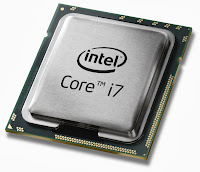
todays i will show u how to make ur processor core i3,core i5,core i7, ..its just a change ur processor name ok lets go just have a fun........


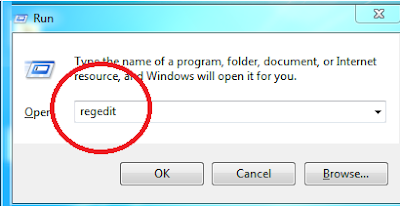
step=1 go to run..and type regedit then ok.....


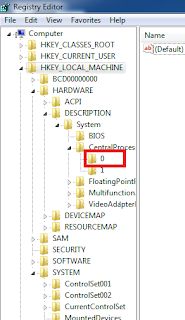
step=2: cleck yes. then go to HKEY_LOCAL_MACHINE


step=3: click hardware .


  step=4:description


step=5:system


step=6: click 0


if you can understand my image instruction then you can watch this video


Read More..

How to break BIOS password to remember and forget

computer tips


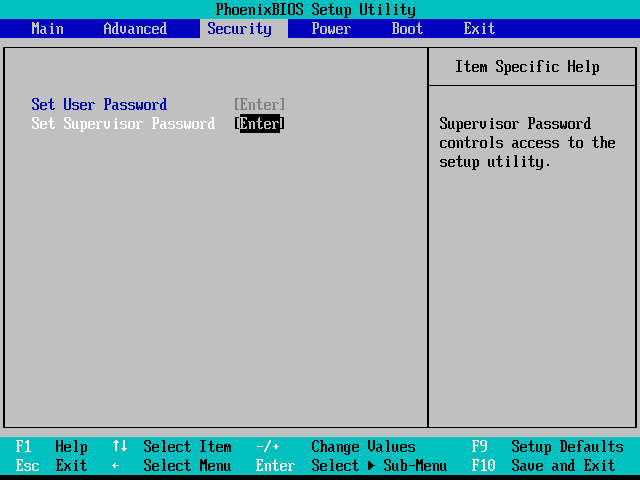
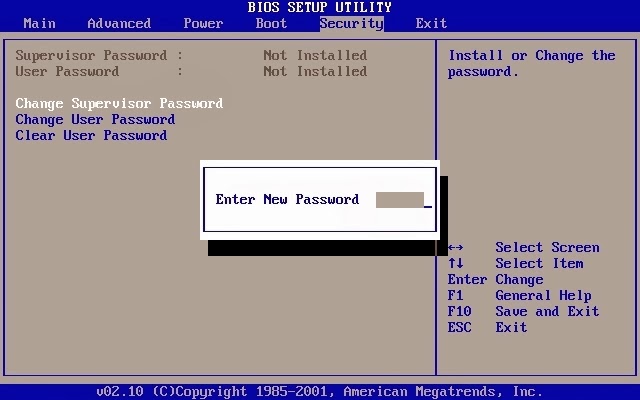
1st-have a look at how to set the password

Restart the PC and boot 1st to enter the menu.
Please enter boot menu the security,Like the photo above


 computer tips


Press F10 to save and go be hire now,the story ends-this password is set in the BIOS celebrities.

See how this password is ever a break?

You can break the password in several ways,I did not know how to present in front of everyone try it but do not feed mind please.

1st system

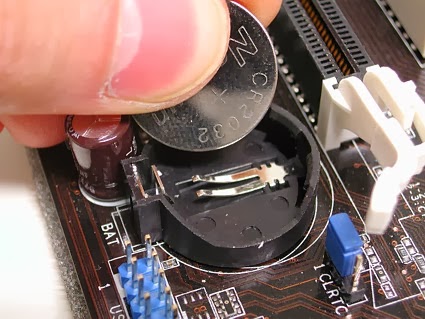
1st day of the  shout down of the PC,remove from the PC and remove the cable.
Open the cover at the PC.

Open the CMOS betters  from the motherboard .see the picture…


computer tips 


Open the CMOS bettery is ta 20/25 minutes at the CMOS bettry on the PC.like the previous set,I hope at ever bypass your BIOS password is lost,if the CMOS bettery is at the moment more that can open,it maybe take sometime or a day.

Read More..
Powered by Blogger.