Improve Speed Of Computer With These Long Term Strategies


If you have a day or 2, I highly recommend you to apply these strategies. Unlike other techniques, it might take 1 or 2 days to improve speed of computer. However, these strategies work better than shortcuts that work temporarily.

Step 1: Remove unused programs and files

A computer is like a library. The more books you have in a library, the harder it is to find the book that you want. When you have lots of files and programs installed in your PC, it will take time to find and load as well. By removing programs and files that you don’t use, your computer will run much faster.

To remove programs, you can use the following steps:

Click on “Start” menu
Choose “Settings”
Choose “Control Panel”
Choose “Add or Remove Programs”
Select Programs that you are not using anymore and uninstall or remove it.

To remove the files, just right click the file and delete. After deleting those files, make sure you empty your recycle bin by right clicking on “Recycle Bin” and choose “Empty Recycle Bin”.


Step 2: Move files to external drives

Move seldom or common used files to External Hard Disk or USB Flash Drives. This is also another step to reduce the “books” in your “library”. These tools are getting cheaper nowadays and very affordable. I highly recommend external hard disk because it has more space and not easy to lose it (people around the world are losing more than 1 million of USB flash drives almost every year).

Moving them is quite simple. Just select, cut and paste it on your external hard disk.

Step 3: Cleaning up your desktop

If you are just like me, you probably have tons of files, program shortcuts and folders on your desktop. It is very convenient and I totally understand it. But having lots of stuffs on your desktop will slow down your computer’s performance.

Cleaning up your desktop make require some planning. Create a folder on your desktop and name it as “Work” or “Studies”. You can create 2 or 3 more folders. Next, create more folders in those folders to organize all your files and programs. Keep a habit to organize your files into these folders.

Step 4: Detect errors and repair

If you have been using your computer for months, your hard drive might start to develop errors and bad sectors. These errors will slow down your computer. Fix this errors once a week by following these steps:

Click on “My Computer”
Right click the drive you use (normally Drive C)
Click on “Properties”
Click on the “Tools” tab
Click “Check Now” button
Check the box that says “Scan for and attempt recovery of bad sectors”
Fix if bad sectors are discovered.

Step 5: Defragment

This is a popular way to improve speed of computer. The steps to defragment are quite simple. Start with clicking on the “Start” menu, choose “All programs”, “Accessories”, “System Tools” and “Disk Defragment”. Click on “Analyze”. Once your computer finish analyzing, click on “Defragment”.

Step 6: Clear hidden Windows errors 

About 90% of SLOW computers are cause by hidden Windows error. Cleaning these errors would be hard if done manually. Fortunately, There’re programs such as PC Speed Doctor to do it for you automatically.

Step 7: Overclocking

Overclocking is a way to hack your own hardware and increase their speed. Overclocking is quite technical too. If you are interested in this step, I highly recommend you to learn from Overclock Your CPU. The author teaches how you can increase processors from 1.9GHz to 3.5Ghz.

Other websites:
  • Computer Fundamentals
  • web design toronto
  • Motorola Surfboard
  • nikon digital cameras
Read More..

Classmarker account create a Google doc with passwords review all keys learned

Today we are going to check to make sure your Classmarker account works (this is the online website we will go tomorrow to take the vocab quiz).  I will give you your username and passwords so you can gain access.

Next we will create a new Google document that will hold all of your usernames and passwords - this way you will have 24/7 access to the usernames and passwords and you wont have to memorize them or carry around papers to help you remember what they are.

After we get that accomplished we will review all of the keys weve learned so far.

Read More..

MOBILE COMPUTING 2 MARKS WITH ANSWERS

guys i have uploaded mobile computing frequently asked 2-marks with anwers........

file size:720 Kb

click here to download
Read More..

Makerbot Lecture 3D Printing with David Wells


One of the nice things about all this crazy travel this summer is I have gotten to do and see some things that are just not available in Richmond, VA. Last night I got to go to the Makerbot store in NYC to hear a talk about 3-D Printing and Maker spaces.

3-D Printing Filament


The speaker was David Wells from the New York Hall of Science. He is the Manager of Creative Making & Learning - I know, best job title ever.

Last year my computer clubs project was 3-D printing. They fund-raised and bought a PrintrBot tight at the end of the year. I am so excited to see where this takes us next year.

The presentation was a great overview of 3-D printing, some of the recent changes and how to incorporate it into maker spaces. One of the general themes was that engagement with museums tapers off as kids hit their teen years, and these maker spaces are a great way to bring them back in.

Several of the folks working at the Makerspace for the summer were there to show off what they were working on. They are part of Maker Corps Education program. They are officially called explainers, which I might borrow for when we do recruitment in the lab.

Oh, and if you are in the neighborhood NYSCI is the host of the Maker Faire NY this fall on Sept 21 - 22. If you havent been to one you must go. Really - its your homework. Find a Maker Faire near you and get to it. I got to do the one at the Henry Ford Museum last summer in Detroit and it was amazing.

Resources:

  • Interview with David Wells - best summary of the Maker movement Ive seen
  • New York Hall of Science
  • MakerSpace @ NYSCI
  • Maker Corps 
  • TinkerCad - Mind to Design in Minutes - This site lets you create the files that the 3-D printer uses
  • Explainer TV from NYSCI - has some fun DIY projects and science explinations


And if you need a story to help inspire you to the power of 3-D printing: 3-D Printer Brings Dexterity To Children With No Fingers.


Read More..

Celebrate the International Day of teh Girl with

Some Great Computer Science Resources


I just stumbled across the Tech Girls Website, and as they point out Oct 11 is the International Day of the girl.

They have a great list of resources - very complete.
Read More..

How does Computer Science fit with No Screens Week


You know how we all have that one Facebook friend, the one that is all granolier than thou about everything? I recently got into one of those discussions about kids and screens.

No screen week is April 29 - May 5 this year.

We are not a big TV family. I spent a good chunk of my childhood in Germany where we had one channel that showed American soap operas, but totally out of order. So TV was never a big thing for me. I just dont like the passive consumption of that much media, especially for small kids.

We currently do not have cable, and the kids watch in short spurts using Netflix. So we usually celebrate no-screens week at our house by turning of Netflix for a week and spending a few more minutes outside with the chickens.

Some things have changes in the last year. My girls are now 10 and 12. They have Kindle Fires and my oldest saved up this fall to buy her own Chromebook this fall. Technically these are all screens...so what to do?

After much discussion we have decided to draw a line between consuming and creating with technology. No Goodluck Charlie or Webkins, but CodeAcademy is OK. For us the kids are outside running around plenty, so more fresh air really isnt the point.

But is does make me think about the role of computer science in our relationships with screens. For too many kids in our country their entire relationship with screens is a passive one. Really, that is the magic of computer science. Like any art, it takes you from being a consumer of a product and puts you on stage as a creator.

And really, that is the point. With computer science, the screen becomes a tool for expression. There is a huge power in that.

Read More..

Telling Stories with Data

Content has moved to CodeVAs Teachers Lounge - latest post: 


Telling Stories with Data: The Most Common Job In Every State

One of the major themes in Computer Science Principles is Data. This interactive map shows how jobs have changed throughout the years. It is a great example of how visualizations ...


Read More..

HTC announces sales in down with 45


HTC continue have problems in despite launch of smartphone the last generation very good.
Taiwanese company that brought on market first smartphones in
2002 together with Microsoft, not fails now to keep up with Samsung or Apple and decreases further . Actually anticipated a descrease of 45% of income compared with previous year,it is thir
d negative review a figures. Already discussed about layoffs and restructuring the divisions.

Revenues on third quarter the financial year will be 2,3 billion dollars,smaller as  previous estimates and expectations specialists .Previous quarter overtook 3 billion  dollars and last year third quarter was 4,5 billion  dollars. Analysts expected at a decrease ,but at some lower

The estimate of minus 45% is most high from listing HTC on Scholarship in 2002.
Read More..

Download Webcam 7 Pro 0 9 9 32 FULL with Patch


Webcam 7 Pro Sudah banyak di sempurnakan dari versi-versi sebelumnya yaitu sudah bisa sobat blogger gunkan di windows2 XP,Win7,dll keculai linux sob... Hehehe... :) ane juga belum twu cara menggunkan softwere ini .... , Webcam 7 i pro ini  menawarkan perangkat tambahan yang menarik.Saat Ini webcam tersedia untuk pengujian beta dan Anda dapat menginstal bahkan jika webcamXP sudah diinstal, ia akan menggunakan pengaturan sendiri, satu-satunya bagian dalam yang umum adalah IP Camera DirectShow filter.
 Dalam FLV streaming yang memungkinkan untuk streaming audio dan video. RTSP DirectShow filter juga mampu mengambil  audio dengan baik  dan video dari beberapa kamera jaringan.
 
 Download Webcam 7 Pro 0.9.9.32 FULL with Patch :
 
Read More..

Envelopes and Labels with Pizzazz MS Word

Have you ever found yourself in MS Words Envelopes and Labels window, desperately trying to change a font, but with no luck?

You probably noticed that the ways you make those changes in your document are locked to you. As long as that window is open, youre not going to have access to the Format menu or any of the drop down menus youre accustomed to using.

So, now what?

You could choose to create an entire page of the labels and then work with font changes on the entire document. Or, with an envelope, you could have the envelope added to the document and make alterations there.

But, what if you just wanted to quickly print straight from the Envelopes and Labels window, without making major changes to your document?

Do you give up and print the boring old envelope or label as it is?

No. Never give up!

While youre in the Envelopes and Labels window, all you need to remember is to right click.

Right click?

Yep, a right click does the trick.

In any of the address boxes on either the Envelope or Label tab, just simply right click.

The pop up menu should be short and sweet and to the point. Youre looking for the Font choice at the bottom.

(On the Envelope tab, you can get to the font window through the Options button, but lets face it, one right click is much quicker!)

If you already have text in the address box, highlight the text that needs to be changed before you right click.

At any rate, once youve chosen Font from the pop up menu, youll be taken to the Font window where you can make the same changes you can make to the text of a document.

When youve made all the changes you need, just click OK.

Youll then be returned to the Envelopes and Labels window to continue on your merry little way!

Read More..

change your processor name computer tips with tricks

computer tips with tricks

processor


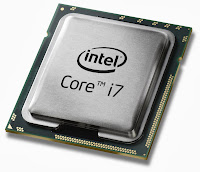
todays i will show u how to make ur processor core i3,core i5,core i7, ..its just a change ur processor name ok lets go just have a fun........


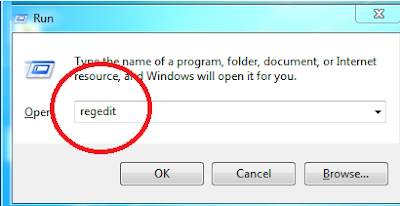
step=1 go to run..and type regedit then ok.....


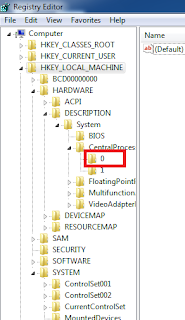
step=2: cleck yes. then go to HKEY_LOCAL_MACHINE


step=3: click hardware .


  step=4:description


step=5:system


step=6: click 0


if you can understand my image instruction then you can watch this video


Read More..

computer fast by super software names ccleaner computer tips with tricks

computer tips with tricks
ccleaner


ccleaner  here is download link and download this software 4.43 mb only. 
                                                                                                                                                                    i have a good suggestion about beginner people for who are using computer but new user.because they dont know how to computer make fast.
so lets go with me and get this soft fast ...and how to  install and works i will show you by image.....follow my instruction                          

step 1= download this software and open it ...........then u can see like the under image.


 step=2: next ....then doing like next image


then click analyze


wait a 100% and then run cleener    done.

if you regular run cleaner ur pc  then get a best performance .


Read More..

Find and Replace with Graphics MS Word

Ever find yourself working with a graphic in an MS Word document that had to be repeated and repeated and repeated?

Did you get tired of all the graphic insertions or the continuous copy and paste routine of placing the graphic in the file multiple times?

Wouldnt it be nice to have a way to place it just once and then have Word "magically" place it everywhere else in the document for you?

Well, Im happy to report there is a way to get Word to do that and it doesnt even require any magic ability at all!

The first step to the process is to insert the graphic into the document the first time it is needed. Also, dont forget to make any needed changes to the picture properties, such as the text wrapping style, before proceeding.

After that, whenever you need to insert the same graphic again, simply enter a distinctive word or a couple of words that will indicate the graphic placement. For example, you could use "graphichere" in your document to indicate a placement point. (You obviously dont want to use a common word, as it could be a part of the document narrative and be replaced by a graphic unintentionally).

Once youre ready to place the graphic throughout the document, go back to the first one youve already inserted.

Select the graphic and copy it.

Now, start up the Find/Replace feature (Ctrl + H).

In the "Find what" field, enter in the word you used to mark the graphic placements.

In the "Replace with" field, enter this: ^c.

At this point, youre ready to begin. You can either go one at a time by using the Find Next and Replace buttons or, if youre sure you used a very distinctive word, you could simply click Replace All.

Voila. When youve completed the replacements, all your graphics will be right where you want them, with no hassle of individual insertions required!

Read More..

mozila fire fox shortcut key computer tops with tricks

computer tips with tricks

mozila
 mozila shortcut


If you are using mozila firefox  then this post will help  you  …
Fire fox shortcut :
Arrow=page up and down just type keyboard  key name=”home “  then page ups.
And type keyboard key name=”end “  then last page.

Spacebar=web page keeps down.
Shift + space bar: web page keeps up.
Alt + home= 1st page open.
Ctrl + = zooming page
Ctrl - = zoom out.
Ctrl + h = Browsing ur web history
Ctrl + t=new tab
Ctrl + w= present tab close.
Ctrl +d =book mark page
Ctrl +l =write url
Ctrl+k =search box
F5 present page relod or refresh.


Read More..

Avast Free Antivirus 2014 with license key till 2099

avast  free antivirus 2014
cool down...i have a very good news all avast antivirus ...todays i am going to give you life time key for avast antivirus .follow my step and get 2014 with license key till 2099......


 There are many questions Avast Internet Security Avast free antivirus and what s the difference ? Thanks , I would differ with . My license key allows you to use until the 2099 if you re to survive : p. Do not believe ? Please download it from here . After downloading the setup.then
1.Go to Setting Click Registration
2.Click offline registration
3.and click “enter license key” in the right and a pop up windows open with a gaps
4.Enter the code: W1208070R9900D1199-T549MYK0


     another: C6788288R9977A0910-8P92KHP0

5.Click OK enjoy the Antivirus to the year 2099 if you are alive 

if you can understand how to install avast software and activate licence key then you can watch this video
 
Read More..

Now is the turn with no SIM free internet computer tips with tricks

computer tips ad tricks


internet


 hi there now you can free use internet in ur sim.......

 What you need:
software needed =just click here and download.
Once youve downloaded and installed the
software. In fact, like the picture below, then click Configure.


Status on the menu and click on Start Connection.


Read More..
Powered by Blogger.