Great Books for CS Principles

The applications to pilot the new CS Principles class are due today. As folks were working on their submissions I have had several questions about books I used as a part of developing curriculum for the course.


I want by starting with a caution. Relying too much on one book runs the risk of locking in your curriculum. The course is most powerful when you have the flexibility to adapt what you are doing to where the students interest point. Relying on only one book you run the risk of robbing them of this experience.

Also, you as the teacher need to be driving your course. Obviously we need materials to fill in gaps in our own knowledge, but you ultimately need to develop these materials to meet your students where they are and pull them into the course.

So, now that I have warned you, here is my partial  list of books I used over the past two years.


  • CS Principles Bookshelf
  • Blown to Bits
  • also Tubes

I am curious, what books have you all been using? Anything unexpected?

Read More..

Posters for Computer Science Careers that use Computer Science

These posters are from the Otronicon Science Center in Orlando, FL. Forget Harry Potter World, we are definitely putting that on the list for our next Florida trip. I am sure this kids wont mind.

Anyhoo, I am fascinated that a science museum has done such a thorough job of including computational thinking and computer science topics in their materials.


Anyway, the posters are free to print and use. They include writing, architecture, linguistics - some fields we dont traditionally associate with computer science.

Some of the other pages have some good resources too. The Medical Sim City page (tagged: See how simulation technology is being used to create better doctors, nurses and other medical professionals) looks like it has some interesting things to help cover the modeling and simulation info in the APCS Principles course, for example.
Read More..

AP Computer Science Report Virginia is for some Coders


The AP data is out for 2013. Some great increased nationwide. AP Computer Science went from 26,103 to 31,117 total exams given, a 19% increase. This was the highest increase out of all of the subject areas. But keep in mind AP Calculus had 282,814 exams last year, so we have a ways to go.


Virginia had 1655 AP Computer Science  exams with a mean score of 3.12. Last year we had 1430 tests with an average of 2.98. Over the past 5 years there has been an 81% increase in the number of APCS exams given. This year was also the highest mean score for the past five years, so some great progress has been made.

According to the state report card 67,805 students took AP exams in 2013 (data here). So teh APCS exam accounted for about 2.5% of the overall number of AP exams given.

Which all sounds great, until you start to look a little deeper.

When you look, in 2013 the number of black students taking the exam was 3. Our max in the past 5 years was 6. Six. That year my personal AP class was 1/3 of those African American students.

Demographically Virginia is about 20% black. With roughly 375,502 students enrolled in Virginia public high schools last year (2013 enrollment data) that means we have roughly 75,000 African American students at the high school level, and 3 took the AP Computer Science exam.


If we randomly assigned students electives we would have fared better.

And you can look at any of the subgroups and see the same trend. For instance for the 2013 exam 25% of the 8 Hispanic students to take the exam sat in my classroom.

Now Im a big believer at starting with data and getting to the stories underneath. The bottom line in Virginia is access.

For instance, Richmond city schools, a predominantly African American school district has no computer science classes. None, zippo, zilch.

This is not about diversity for diversitys sake. This means these kids do not have access to jobs. According to the Bureau of Labor and Statistics Virginia is 4th in the nation for jobs in this area, but 12th population wise. This means we have the highest concentration of jobs nationwide in computer science. Washington DC and Virginia rank #1 and 2 for salary nationwide - so these great jobs cannot be filled by huge numbers of our children. A child sitting in Kindergarten in Richmond City Schools today may never even know this field exists, literally blocks from the front door of their school

And at a deeper level, computer science is the tool we use to solve human problems. Being the person holding the tool means you get to decide what is a problem and what gets a solution. These numbers mean these communities do not get to participate.

So to change the data, we have to change the stories. Every high school in the state needs computer science classes that are rigorous and relevant for its students. That means trained teachers and a working curriculum. Kids and parents need to know that this is an option for them, that they can create using this tool. They need to be able to tell their stories as we build the future.

A few things to put Virginia in Context:

  • Virginia has not adopted common core
  • Our K-12 end of course tests are called the SOLs (Standards of Learning). Yes, really
  • AP Computer Science counts as a 4th math credit here, but only if you are going for an advanced diploma, and you have passed Alg II. were working on it
  • We are a Commonwealth, which means our school systems are driven at the local level, not by top down policy and curriculum from the state.
  • Out legislature meets either 4 or 6 weeks a year, thats it. 


Read More..

Using In built Modem for Huawei Dongles in Windows 8

Using In-Built Modem Dialer for Huawei Dongles in Windows 8


As you all are aware that by using Huawei or any other companys 3G dongle, we can surf the web at high speeds on-the-go.  There are lots and lots of 3G dongle models are available in market that will suit your need.  Previously, we used to buy a carrier-locked 3G dongle that will not accept any other Operators SIM card for use.

But now, Huawei itself has launched its own range of dongles that are factory unlocked and ready to be used with every Operators network.  Just insert the SIM, and start enjoying High-Speed 3G Internet on-the-go depending on the availability of Network in your locale.

But what if you dont want to mess up with your Operating system by installing extra software eating up your system resources.

In this post, you will see how we can use in-built modem dialer of Windows 8 to get connectivity with Huawei Dongles.

You need only to download and install latest Huawei Dongle drivers and you are ready to surf the web without any headache.  If you have already installed Mobile Partner, then you dont need to download anything else.

Windows 8 offers in-built Modem Dialer for Mobile Broadband so that you can surf the web in seconds without having trouble.

After installing Drivers, just restart the system and you are ready to surf the Internet via Dongle.


Steps to use In-built modem:
  • Plug-in your Huawei Dongle on your Windows 8 Machine.
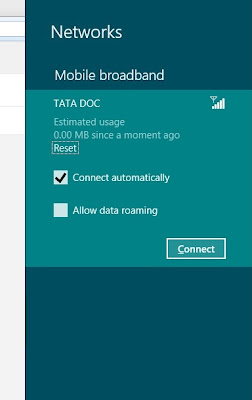
  • Click on Network Icon on your Windows 8 taskbar.
  • Find your Dongle under Mobile Broadband and click Connect.
  • Enter APN (Access Point Name) and you are ready to surf the Internet.


By this method, you can only connect to Internet.  Unfortunately, You CANNOT check Balance or make calls from this method.  You need to install Mobile Partner Dashboard to accomplish those services.  You can get latest version of Mobile Partner here.

Steps to install:


Extract ZIP and open DriverSetup.  Open as Admin by right clicking.  After Install restart machine. 

Download Details:
File Name:  Huawei Drivers.zip
Version: 4.25.06.00
Size:  6 MB

Download link:
http://www.mediafire.com/?fht0ofdbf7o5e3f

Pass:  computerworldblog


Enjoy...
Comments welcome...
Read More..

Get email alerts in your mobile for free

Guys now you can get free email alerts in your mobile.....
which will block unnecssary alerts such as Facebook.com
- Orkut.com
- Horoscopefree.com
- Bagittoday.com
- Linkedin.com
- Firstnaukri.com
- Chingoracle.com
- Snapdeal.com
- biorhythmfree.com
- ibibopromotion.com
- bmsrv3.amubm.com

To activate this alerts,visit this website.
Read More..

Preparing for pitch day

Preparing for Pitch Day. Im am preparing for Pitch Day, Pitch Day is when I go and pitch my idea to a school board and they ask questions and think my idea is good or not. For Pitch Day I need to have a video to show to them that shows my idea. I need to make the video about computers and Im going to talk about my way Im going to build computers. In order to be ready I still need to make a video and figure out how Im going to explain my idea. I also need to probably post a little bit more on my blog so look out for that. I may or may not need to but still look out for more posts in the future I might try to put a calendar for when they come out to so. Thats a little bit about pitch day.


Read More..

Recruiting for Computer Science the AP Potential Report

For many high schools it is recruiting season. If you school has an AP program there is a little kown report, called the AP Readiness Potential, that can help you in attracting kids to your classes. This is an especially helpful way of identifying girls and other groups that may not already be taking your Computer Science classes.


Basically this report takes students PSAT scores and predicts the AP tests they are statistically likely to score well on. It is based on a past correlation between past PSATs and AP exams.

While we do not yet have this for APCS Principles, since no AP tests have been given yet, we do have it for the current APCS class.

A new feature is teachers can now log in to see the reports. To access the report you will need an access code. You can get this code from the person in your building that coordinates the AP exams. I find that person often doesnt know about the report, or have any idea of how to find the code.

You can call to get your schools code. The number is 866-630-9305. You just have to identify yourself and your school.

The login for the site is here. Youll need an account for AP Central. Once you pull the report the site even has sample letters to send home to parents. I have found letters directly to parents to be a powerful way to attract kids to computer science.

Long term I am very curious to see how this test correlates for the new APCS Principles class. Since much of the assessment for this course will be written it will be interesting to see if a correlation with the writing section of the PSAT.
Read More..

Breaking News! Computer Science for Graduation Credit

In case you missed it Washington state now allows computer science to count as a math or science credit towards graduation.

For the IB diploma cs has recently moved from an elective to a science credit.

Here in VA there has been a lot of conversation around where cs should sit at the high school level. For us it currently sits as either a CTE credit or as a math elective after Algebra II.

The issue comes in for kids planning on pursuing more education in technical fields. The reality is they need more than Algebra II.

Does anyone know of any other states moving this direction?

Read More..

Top 10 Computer Science Tweets for APCS Principles

APCS Principles has a lot of great places to include articles and news about computer science for student readings. Here is a summary of some of the more interesting ones I have posted on Twitter recently:


  • Computer chemists win Nobel Prize - great read for #APCSP, and every guidance department in us high schools
  • Breaking Brick Stereotypes: LEGO Unveils a Female Scientist
  • Data Unit - Ten Simple Rules for Reproducible Computational Research 
  • Data  - Future of Statistics  
  • Rage Against the Algorithms 
  • Potential for #apcsp? Open auto essay scoring engine from CMU looking for pilot schools 
  • First 2 3D printers in Haiti - printing umbilical cord clamps & other medical devices. 
  • Simple testing can boost CS education 29% overnight!
  • Whats the coders responsibility? Facebook-alpha testing program not for the faint of heart
  • Advertisers could track your smartphone through accelerometer, researchers find 
  • Every Second on the Internet 

Read More..

Getting Things Done for Teachers


Teaching can be like a field trip back to 1982. Phone access is limited and the web is filtered (if it is working at all that day).

So trying to stay productive in a web 2.0 world can be a challenge.

1982 called - they want their technology back


One of the best tools I have developed over the past few years is adapting the principles of David Allens GTD to the classroom.

The system is pretty inclusive, and you can read about it in lots of details in his books. For me there are two parts that have worked especially well in the classroom.

The first is changing how you tag your to do list. I used to keep it by noun- or topic. So it was sorted by APCS, Intro class, or Website. In other words I listed things by what part of my job they were related to.

Which had nothing to do with WHAT I actually had to do.

So now I keep the list by verb. By what I actually need to do. So I have a phone call category and a errand school category. And grade and email categories, you get the idea.

As you all know just getting to the phone or to the office to check your mailbox can be a real challenge. I want to make sure when I get to use the phone I have a full list of ALL the parents I need to call. If I am going to make the 5 minute trek to the front office (my lab is in the absolute back corner of the school) I want to make sure I have everything I need with me.

To support this I built a binder specifically for my planning period where I stick all the paperwork that fits these categories, so everything is in one place when I actually get planning time. That typically is about 30 - 45 minutes a day, so that time is pretty valuable.

I use Remember the Milk for my list. It makes filtering by activity super simple and I can add things on my phone. There is a free version of the app.

The second part I really use is the weekly review. The idea is you regularly go through all of your inboxes - email, mailbox, papers to grade, all of it, and you build and capture what is there and what needs doing. This year I am managing these reviews about every other week due to my limited planning time.

Again, there are tons of web resources out there describing different takes on this. I keep it pretty basic. The idea is everything you touch (or open in the case of email) gets planted somewhere. For me it is either a to do, something to store and reference later, or trash/recycle.

Included in this is a review of the calendar. I look over the past few weeks to see if there is anything unfinished still hanging out there, and look ahead and cross check my lesson plans so I am not tying to do a class discussion on the day of the senior picnic.

Anyhoo, I keep getting asked this year how I get everything done. Frankly I dont, but having this system in place lets me really concentrate when I need to without worrying that I am forgetting something. And sometimes the appearance of efficiency is almost the same thing.
Read More..

Data for Dates

My latest post is over on the CSTA site - Enjoy!

http://blog.acm.org/csta/
Read More..

Apply for the next phase of the CS Principles Pilot

Apply Here


From CSPrinciples.org:


The College Board’s AP Program and the CS Principles (CSP) project team invite you to complete an institutional survey as part of recruitment efforts for the next phase of course and exam development. The information you provide will be reviewed by a search committee to help with the final selection of 50 institutions (roughly 40 high schools; 10 colleges/universities). This cohort of pilot schools will continue piloting the course under the auspices of the College Board for the next three years. That is, we expect selected pilot schools to begin piloting the course next academic school year (2013-14) and continue piloting the course until the end of academic school year 2015-16. The AP CS Principles course is scheduled to launch in the fall of 2016, with the first AP exam administration in May 2017.
 
To complete the survey go to: Complete the AP CS Principles Pilot Institutional Survey, you must also upload a syllabus as part of your application.

The deadline to complete the survey and upload the syllabus is Wednesday, April 17.


Read More..

Mobile Partner Dashboard for Windows 8

Huawei Mobile Partner Dashboard


Mobile Partner by Huawei


FULLY SUPPORTED WITH WINDOWS 8


Mobile Partner is a dashboard software available for Huawei Internet Dongles created by Huawei Technologies.  Here you will find latest version of Mobile Partner with almost every operators Internet setting built in.


Almost everywhere on Internet, there are lots of Mobile Partner Dashboards available for download, but unfortunately none of them will work with Microsofts latest Operating System Windows 8 because of their driver incompatibility.

In this post you will find Mobile Partner latest version, which is fully supported and compatible with Windows 8, 100% tested working.


This is a 100% clean download and company-provided Dashboard and it is not modified in any state.

Screens:


Images and Logos are copyrighted to their respective owners.  Do not copy/reuse without permission.


With its Easy-To-Use One Click CONNECT button, you can get yourself connected within few seconds.  Enjoy High-Speed Internet On-The-Go with this new Dashboard.  Almost all network profiles are integrated by default from Huawei in this dashboard.


Download Details:

File Name:  Mobile Partner.zip
Supported OS:  XP/Windows 7/Windows 8
File Size:  25.5 MB
Version:  23.009.09.02.910
Date Updated:  20 July 2013

Download Link:
Click To Download

Enjoy...
Read More..

Bring surrounding the chat options for Facebook

facebook


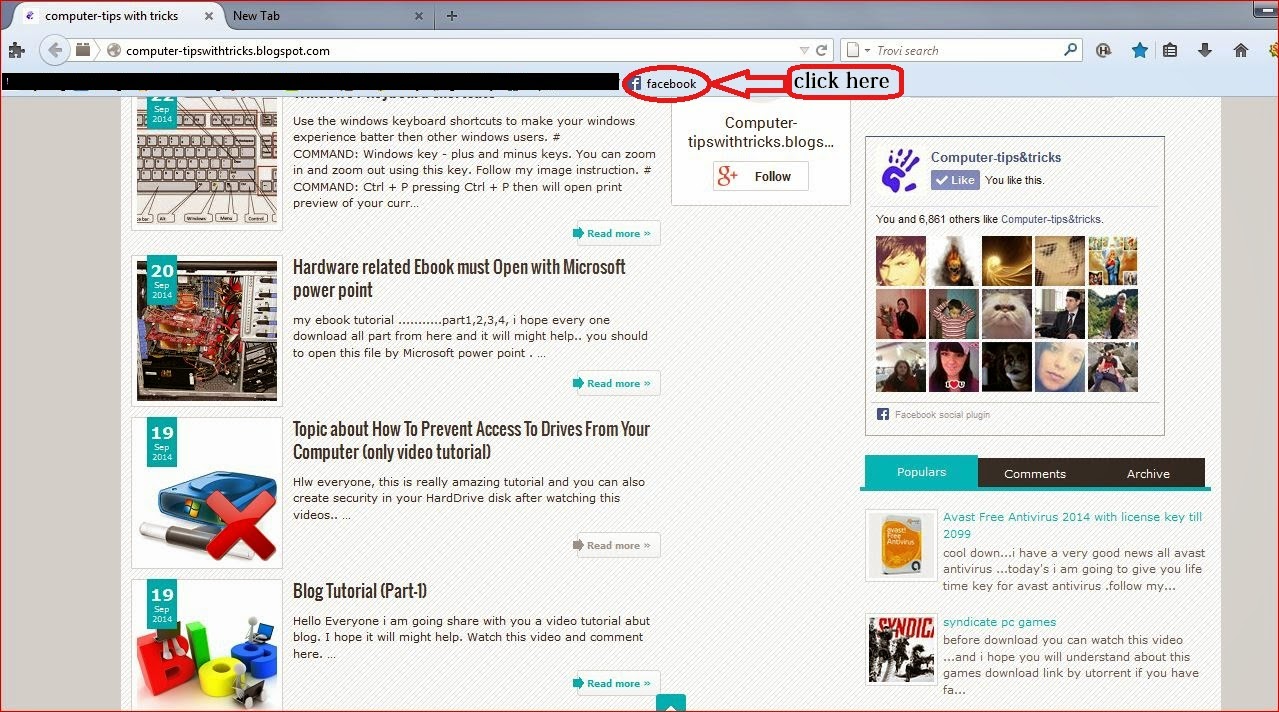
Hello everyone, how are you all? Today i am going to show you how to how keep extra facebook chat option in your  browser. So, follow my instruction..

#open your then follow the image bellow
1


2


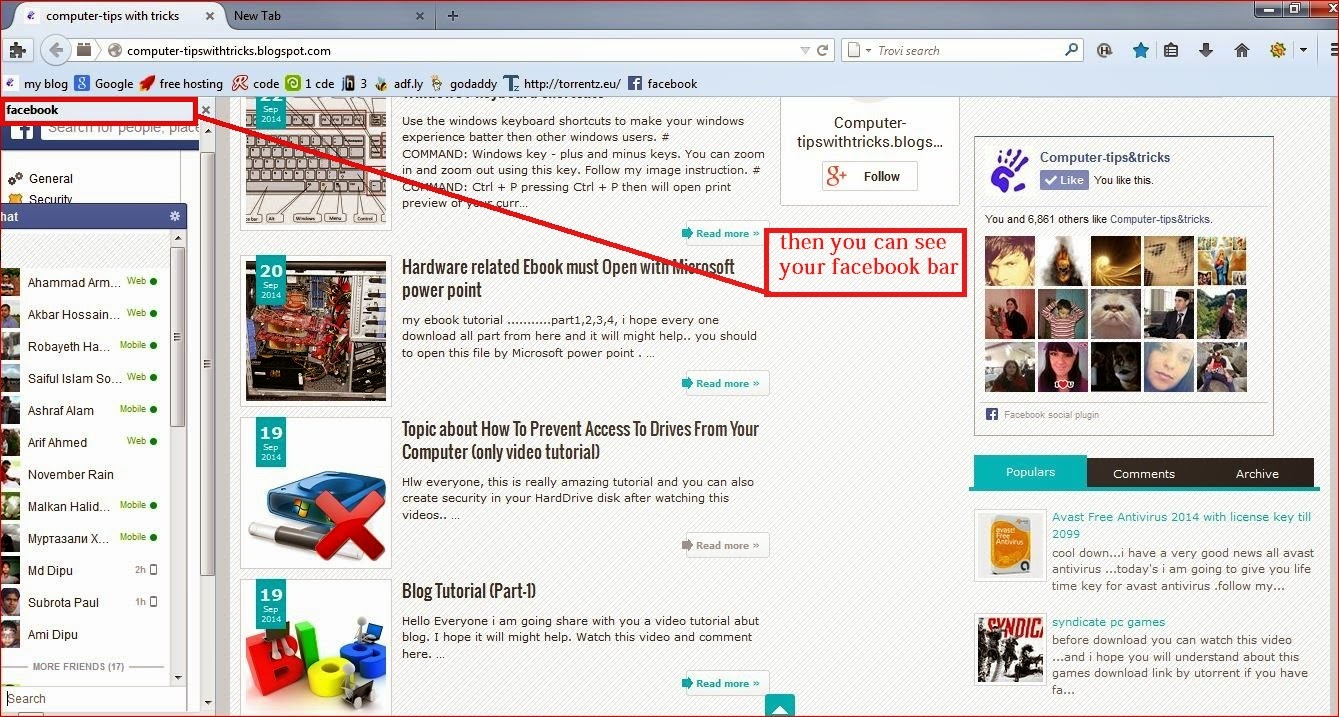
# paste the url http://www.facebook.com/presence/popout.php in the location box


#ok now time to check our process ..how can its work follow my image

4


5


Read More..

Navigation Shortcuts for MS Word The Keyboard

Picture this: Youre working on the ultimate document. I mean, its a masterpiece! Too bad the masterpiece is also a nightmare though. Its easily the longest document youve ever edited and the navigation through all those pages is just a huge headache. (Not to mention the back and forth, back and forth between the keyboard and the mouse). I bet youre looking for some help, huh?!

Well, never fear. Im here to save the day! While these shortcuts wont make your document shorter, they will help to ease the pain as you try to navigate through your work and hopefully, without the need for aspirin.

Today, lets begin with some basic keyboard shortcuts:

  • Arrow keys = moves one space or line in the arrow direction.

  • Ctrl + Left or Right arrow = moves the cursor one word left or right.

  • Home = moves the cursor to the beginning of the current line.

  • Ctrl + Home = moves the cursor to the top of the document.

  • End = moves the cursor to the end of the current line.

  • Ctrl + End = moves the cursor to the bottom of the document.

  • Page Up = moves the cursor up the length of one screen.

  • Page Down = moves the cursor down the length of one screen.

  • Ctrl + Page Up = moves the cursor to the previous page in your document.

  • Ctrl + Page Down = moves the cursor to the next page down in your document.

If youre mouse dependent, give these a try. Im sure youll find them to be a great aid in your quest to be even more efficient!

Read More..

Navigation Shortcuts for MS Word The Scroll Bar MS Word

To go along with yesterdays tip, here are a few tidbits for document navigation in MS Word with the mouse on the vertical scroll bar.

The first and easiest is to realize that when you click and hold on the scroll bar, a text box will appear that tells you what page youre scrolling to and the section title that begins the page. This is really helpful in a very long document. It keeps you from playing the guessing game as to where you are with the scroll button. (It cuts down on the "Oops! I went too far" problem as well!)

Below the scroll bar, youll find a series of three buttons. See them?

These little gems can be extremely useful.

The top and bottom buttons (double up and down arrows) are for moving one object up or down. Notice, I used the word "object" and not page. No, its not a slip of the tongue or in this case, the fingers.

The middle button (the dot) is called the Select Browse Object button. It allows you to select what items or objects the double up and down arrows jump to. For example, if you set the button to Graphic, the up and down arrows will jump from graphic to graphic, regardless of how many pages are between each graphic.

To see your choices, click on the Select Browse Object button. You should see a small palette of choices appear.

Select something from the palette that will aid you with your editing. The name of the icon will appear in the gray box along the bottom as you run the mouse pointer over each icon. (I tend to use either Browse by Page or Browse by Section, but you need to choose whatever will help you the most).

Once youve made your choice, the up and down arrows are immediately ready to jump from object to object, with the word "object" now being defined by the item you chose.

Keep in mind that you can change this setting whenever you wish, so put it to good use.

Well, between yesterday and today, theres a pretty good list of items to learn. Give them a try. Theyre such small things that add up to a lot of saved time when used regularly. I dont know about you, but Im always looking to save time!

Read More..

Without knowing change your friends windows password hacking tricks for windows 7

passw


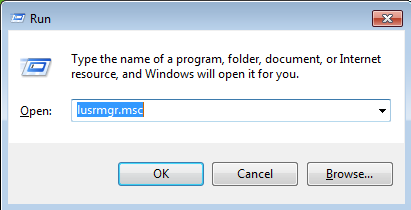
1st step: go to run then type this code lusrmgr.msc and then enter.
computer tricks


2nd step: open a new window then click users folder 


3rd step: The you can see your windows username 


4th step: follow my image instruction


Read More..

Take it to measure small software Age Calculator for Java Symbian and android Phone computer tips with tricks


Today I will present you the things that are in this name Age calculator. There may be many people software. Wish to whom it can collection. This software can estimate your age within a few seconds. Java and Symbian software size only  4KB and 897KB androids software size only.   

http://computer-tipswithtricks.blogspot.com/


 click it for java and symbain phone
http://lifebd.ml/site_53.xhtml  

 click it for android :http://lifebd.ml/site_grameenphone_gp_app_for_android.xhtml
Read More..

computer tips some useful tips for your compele online security

computer tips


  the goal of every good thing if the neighborhood has seen some of the worst aspects. Just as with Internet viruses, etc.(computer tips) . Though this is the beginning of things, but the latest plan premium over the last few years with the increased use of the Internet against the step, step increases in these activities continues icon sad some tips for you to complete online security include it with the hacking.


     the use of the internet is still largely ignorantabout these. Allowingthem to stay safefrom these is really a big challenge.Among these challengesare the result ofeveryone having sustained, victims of virusattacks and hacking!      
    computer tips
2  Todays, we know some of the tips and will concentrate on trying to understand the course and I hope everyone will use the icon smile full of useful tips for online security . Because you need to stand up to you to challenge. I just cannot do anything faster than a directed icon sad some useful tips for your complete online security. Let s get down to the ground


   it is expected that following instructions must be 90 % securing icon wink you some tips for you to complete online security

1/ must always use good anti-virus software and update it regularly to try to keep. The PC so it cannot be attacked spears Please install the  Anti spayara .

2/ always known website, blog groups to visit. Before visiting a new website to ask others about it and find out as much as possible in different ways. And of yes, no, or do not understand appreciate click the link or banner must stay away from.

3/ No file / mail etc. When we download on the PC before you can open it and take the scan. If you have any problems with this file, it will be caught. Remember, this is the digital age; the eye is able to damage the small problem that gets much bigger project.

4/ regularly update your operating system and browser. Get better and better quality service, leaving most of the old version to the new version of the Learn to use.

5/ blown in no case did not no nothing anywhere to share your password. Put all the tough kinds of passwords , such tamim ** @ zxcv12300 ** and every 3 months during the course , will change every password security icon big grin some useful tips for your entire online
 
      6/ All the sites or pages linked to the address on the address bar of your browser .

7/   you need to enter your password in order to log in before you can see if there is a link to the https Example.https :/ / mail.google.com. If you must quickly leave the http://
Read More..
Powered by Blogger.